Pivotal: A better syntax for data analysis in Python
Python has become a standard language for data analysis — particularly in corporate and government teams — and with good reason. Python is a great language, known by all, with an excellent data ecosystem, and it’s free.
I love Python. But I don't love Pandas. By its creator's own admission, Pandas syntax has some strange quirks and is rather verbose. While analysts might come to Python for the powerful data science tools, they invariably spend a lot of time doing basic data wrangling — which in Pandas is harder than it should be.
Pivotal is my attempt to address this. Pivotal is a Domain Specific Language (DSL) for data analysis with a concise syntax that compiles into Python (using either Pandas, Polars or DuckDB backends). Pivotal is designed to support interactive Python workflows with a language that is faster to type and easier to read, while still operating over Python data structures and integrating tightly with Python code.
Let's take a look
Pivotal has a declarative syntax similar to SQL while incorporating aspects Python (pandas) and R (dplyr) grammar. The below example compares Pivotal to equivalent Python code for some basic data wrangling in a Jupyter Notebook:
%%pivotal
load "invoices.csv" as invoices
load "customers.csv" as customers

with invoices
    filter invoice_date >= "1970-01-16"
    transaction_fees = 0.8
    income = total - transaction_fees
    filter income > 1

with invoices as summary
    group by customer_id
        agg mean total, sum income as sum_income, count total as ct
    sort sum_income desc
    left merge customers on customer_id
    name = last_name + ", " + first_name
    select customer_id, name, sum_income

save "my_analysis"
    path "~/projects/output"
import pandas as pd

invoices = pd.read_csv("invoices.csv")
customers = pd.read_csv("customers.csv")

invoices = invoices[invoices["invoice_date"] >= "1970-01-16"]
invoices["transaction_fees"] = 0.8
invoices["income"] = invoices["total"] - invoices["transaction_fees"]
invoices = invoices[invoices["income"] > 1]

summary = (
    invoices
    .groupby("customer_id")
    .agg(
        mean_total=("total", "mean"),
        sum_income=("income", "sum"),
        ct=("total", "count")
    )
    .reset_index()
    .sort_values("sum_income", ascending=False)
    .merge(customers, on="customer_id", how="left")
)

summary["name"] = summary["last_name"] + ", " + summary["first_name"]
summary = summary[["customer_id", "name", "sum_income"]]

invoices.to_csv("~/projects/output/invoices.csv", index=False)
summary.to_csv("~/projects/output/my_analysis.csv", index=False)
import polars as pl

invoices = pl.read_csv("invoices.csv")
customers = pl.read_csv("customers.csv")

invoices = (
    invoices
    .filter(pl.col("invoice_date") >= "1970-01-16")
    .with_columns([
        pl.lit(0.8).alias("transaction_fees"),
        (pl.col("total") - 0.8).alias("income")
    ])
    .filter(pl.col("income") > 1)
)

summary = (
    invoices
    .group_by("customer_id")
    .agg([
        pl.col("total").mean().alias("mean_total"),
        pl.col("income").sum().alias("sum_income"),
        pl.col("total").count().alias("ct")
    ])
    .sort("sum_income", descending=True)
    .join(customers, on="customer_id", how="left")
    .with_columns(
        (pl.col("last_name") + ", " + pl.col("first_name")).alias("name")
    )
    .select(["customer_id", "name", "sum_income"])
)

invoices.write_csv("~/projects/output/invoices.csv")
summary.write_csv("~/projects/output/my_analysis.csv")
Pivotal has been designed to be easy-to-type, with minimal use of punctuation, symbols or brackets, in order to support fast interactive data work. Pivotal's syntax is also more human-readable which remains important for collaboration, code sharing and verification.
| Pivotal | Python (Pandas) | Python (Polars) | |
|---|---|---|---|
| Lines | 18 | 23 | 29 |
| Characters | 547 | 866 | 911 |
| Key presses | 542 | 937 | 983 |
| Tokens | 103 | 256 | 299 |
This second example shows a data science workflow: data loading, feature engineering, model training and result processing. While stylised, this is representative of real workflows, where a high proportion of code is devoted to processing data inputs and outputs relative to actual modelling.
Because Pivotal compiles to Python it's easy to access Python objects and functions within Pivotal code, and to intersperse Python and Pivotal either in Notebooks (as above) or in Pivotal script files (as below).
load "daily_climate.csv" as climate
load "crop_data.csv" as crops

python grow_min = 8; grow_max = 32; crop_season = [4, 10]   # In-line python

with climate as climate_features                    # Feature engineering
    year = year(date)                                       # Built-in date functions
    month = month(date)
    filter month between :crop_season                       # Reference Python list
    grow_degrees = (max_temp + min_temp) / 2 - :grow_min        # Conditional assignment
        where max_temp < :grow_max and min_temp >= :grow_min
        else 0
    group by year, region
        agg sum grow_degrees as gdd, sum rain as grow_rain

with crops as training_data
    inner merge climate_features on year, region
    select year, area, yield, gdd, grow_rain, region

python                                                      # Python analysis block
    from sklearn.linear_model import LinearRegression
    X = training_data[["year", "area", "gdd", "grow_rain"]]
    training_data["yield_hat"] = LinearRegression().fit(X, training_data["yield"]).predict(X)
end

with training_data
    pivot plot line nat_pred_vs_actual                      # Aggregate and plot in one
        x year "Year"
        y wmean yield area, wmean yield_hat area "Wheat yield (t/ha)"
import pandas as pd
from sklearn.linear_model import LinearRegression

grow_min = 8; grow_max = 32; crop_season = [4, 10]

climate = pd.read_csv("daily_climate.csv")
crops = pd.read_csv("crop_data.csv")

climate_features = climate.copy()
climate_features["year"] = pd.to_datetime(climate_features["date"]).dt.year
climate_features["month"] = pd.to_datetime(climate_features["date"]).dt.month
climate_features = climate_features[
    climate_features["month"].between(crop_season[0], crop_season[1])
].copy()

climate_features["grow_degrees"] = 0.0
mask = (
    (climate_features["max_temp"] < grow_max)
    & (climate_features["min_temp"] >= grow_min)
)
climate_features.loc[mask, "grow_degrees"] = (
    (climate_features.loc[mask, "max_temp"] + climate_features.loc[mask, "min_temp"]) / 2
    - grow_min
)

climate_features = (
    climate_features
    .groupby(["year", "region"], as_index=False)
    .agg(
        gdd=("grow_degrees", "sum"),
        grow_rain=("rain", "sum"),
    )
)

training_data = crops.copy()

training_data = (
    training_data
    .merge(climate_features, on=["year", "region"], how="inner")
    [["year", "area", "yield", "gdd", "grow_rain", "region"]]
    .copy()
)

X = training_data[["year", "area", "gdd", "grow_rain"]]
training_data["yield_hat"] = LinearRegression().fit(X, training_data["yield"]).predict(X)

plot_data = (
    training_data
    .groupby("year", as_index=False)
    .apply(
        lambda g: pd.Series({
            "yield": (g["yield"] * g["area"]).sum() / g["area"].sum(),
            "yield_hat": (g["yield_hat"] * g["area"]).sum() / g["area"].sum(),
        })
    )
    .reset_index(drop=True)
)

plot_data.plot(x="year", y=["yield", "yield_hat"], kind="line", xlabel="Year", ylabel="Wheat yield (t/ha)")
The Pandas problem and the DSL solution
Pandas limitations have been well-documented, most notably by its creator Wes McKinney. Firstly, there are the quirks: including indexes, that most people try to avoid, leading to boilerplate like .reset_index() or as_index=False. Then there are the long standing performance limitations (lessened somewhat by recent updates).
There are of course alternatives. Polars offers better performance and has no indexes, but the syntax is even more verbose (see above example). And if we are being honest, the R tidyverse probably offers a better experience for interactive data work than anything in Python (but its in R).
The one thing all these options suffer from is trying to embed a data processing grammar within a general purpose language. This leads to annoyances like having to wrap column names in quotations and explicitly reference data-frames at all times, for example:
compared with:
The longevity of SQL tells us something about the utility of DSLs for data work. In recent years, SQL has become better integrated with Python through libraries like DuckDB, while new piped-SQL syntax including PRQL offer a more linear Python/R style of working.
In some respects, DuckDB and PRQL address similar problems as Pivotal, just from the opposite direction: trying to modify SQL to bring it closer to Python, rather than building a native Python workflow that is more SQL like.
Ultimately, there are limits to how far you can bend SQL to suit Python analytical workflows. In practice, the mental (and performance) overhead of moving data between a SQL engine and Python can slow things down (especially for exploratory work on small datasets).
How Pivotal works
Under the hood, Pivotal is a simple code generator that takes strings of Pivotal syntax and outputs strings of Python code. Pivotal is written in Python, and uses the Lark package to parse Pivotal code into an Abstract Syntax Tree or AST (ie., a Python dictionary). From this AST, Pivotal can then generate code for multiple backends including Python Pandas, Polars or DuckDB/SQL code:
from pivotal import DSLParser
pvtl = DSLParser()
print(pvtl.export("with mydf\nselect columnA, columnB", backend="pandas"))
While Pivotal is young, the scope is reasonably extensive covering all the common Pandas / SQL data operations, along with a range of more complex tasks like window functions and date and string manipulation (see the docs). Pivotal also includes commands for producing outputs, including plots (via matplotlib), tables (via Great Tables) and saving to Frictionless data packages. For any tasks that can't be done in Pivotal there is an easy Python "escape hatch".
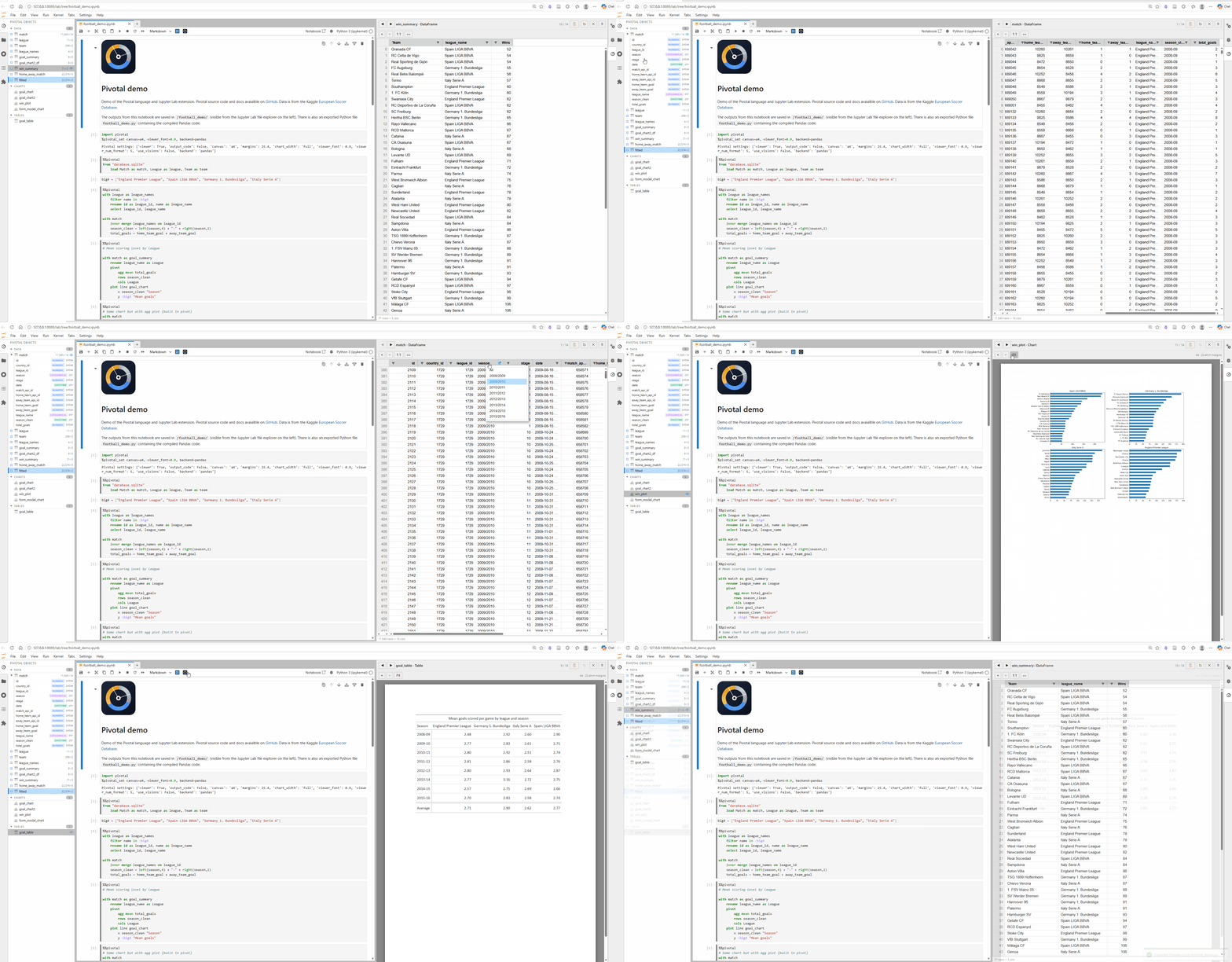
Pivotal has been built with Jupyter Notebooks front of mind. The JupyterLab extension includes %%pivotal cell magic with syntax highlighting and context aware auto-complete (column and table name completions), along with GUI features including interactive object viewer and explorer (with AG Grid spreadsheets and table and plot previews). The VS Code extension offers much the same functionality.
We need your help
It would be misleading to say I've built Pivotal myself, given the involvement of AI agents (Claude and Codex) which at this point feel more like collaborators than servants. This project is well suited to AI given LLMs have been trained on so much SQL and Python already, and it's easy to define objective tests for language parsing and execution. There is a lot more to say about all this, including whether good syntax even matters if AI can write the code for us (it does, but that's for another time).
While AI speeds up development, there's still a strong need for human guidance, given the purpose of the project is to develop a language better suited to human tastes and ways of thinking. The key thing Pivotal needs at this point is more feedback from more humans. So please give Pivotal a go and let me (and Claude) know what you think.
Try out Pivotal:
pip install pivotal-lang pivotal-lab
Read the docs: nealhughes.net/pivotal-py
Join the discussion on GitHub: github.com/nealbob/pivotal-py/discussions